Learn how to add a chat widget without losing pagespeed
Add a chat widget like facebook messenger to your website without impacting core web vital mettrics.
Impact of a chat widgert on your Lighthouse performance
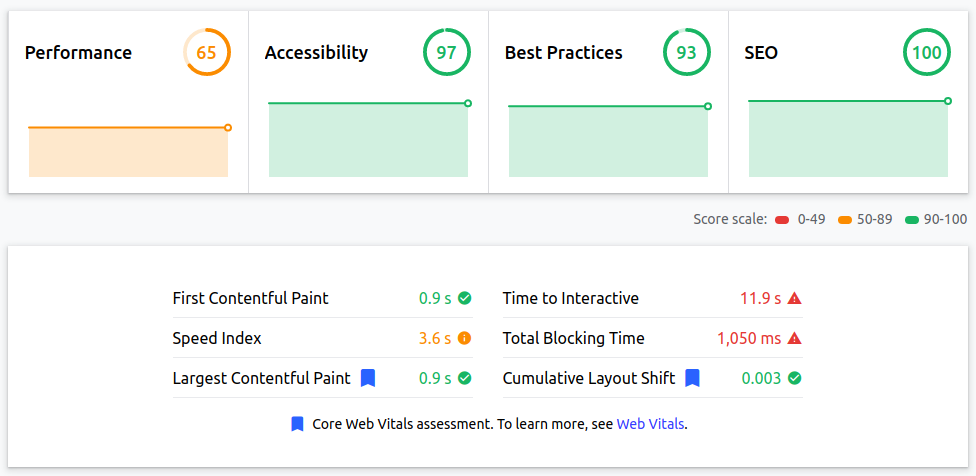
Google maps embedded through the default embed code as presented on Google maps is not as fast as you might expect from a Google service. It takes up 14% from my perfect 100% pagespeed score. Google maps has a large impact on your lighthouse metrics:
Speed index +3.6sec Speed index tripled due to rendering and blocking
Time to interactive +11.9sec. The time to interactive is about 5 times as high since Google maps will
Total blocking time +1 sec. Google maps is blocking the main thread for 320ms. Exactly what we are trying to avoid.
The first thought of a web developer might be to add the loading="lazy" attribute tot the iframe. Unfortunately that does not change anything. Lazy loaded iframes are still loaded early and impact your lighthouse metrics. That is why we need a smarter approach.
How to Improve Chat widgets Speed and get that 100% lighthouse score
We are going to remove the negative impact Google maps has on initial pagespeed by deferring Google maps until the first interaction with the map. We will assume that any interaction will start with the mouse-over event (even on mobile phones)
1. Create a placeholder
We will start by creating a placeholder image of the visible map. This might sound simple but it's actually pretty difficult to crop the exact dimensions of the map with a screen capture tool That is why, to create the perfect placeholder, we will open up Firefox. Inspect the iframe in the Firefox console by right clicking on the page and select 'inspect element'. Locate the iframe HTML node, right click it again. This time select 'Create screen-shot from node'. This will create a screen-shot of only the Google map.
2. Convert placeholder to WebP format
Convert the image to WebP format with your favorite image compressor or use the command-line utility cwebp cwebp -q 60 image.png -o image.webp.
3. Create the parent container and placeholder
For responsive maps we are going to use this CSS trick where an iframe ration is maintained at all times though padding as a percentage of the parent container. This same parent container is used to hold the placeholder as a background image. The data-src attribute will be used for the iframe source that holds the action Google map.
First create the parent container: <div data-src="https://maps.google.com/mapsq=fyn+()&z=9&output=embed" class="map" id="mymap"></div>
Then add the placeholder image as a background for this container: #mymap{background: url(/image.webp); background-size: cover;}
3. Load the real map on first interaction
this is where the magic happens. Without this small piece of JavaScript the map will just be a static image. This JavaScript adds (and removes) an eventlistner to the #maps div and on first interaction with the div the actual maps embed iframe is injected into the div.
          var map = document.getElementById('mymap');

          var maplistner = function(e) {

          var frame = document.createElement('iframe');

          frame.src = this.getAttribute('data-src');

          map.appendChild(frame);

          map.removeEventListener("mouseover", maplistner);

        };

        map.addEventListener('mouseover', maplistner);
3. Preload the placeholder image (optional)
If the Google map is immediately visible in the view-port the placeholder image should be preloaded. <link rel="preload" href="/image.webp" as="image" type="image/webp" crossorigin>. In this example case pre-loading the placeholder image speeds up the LCP by almost a second.