优化 LCP 资源加载时长
从延迟到展示:了解如何改善 Largest Contentful Paint 的资源加载时长部分

优化 LCP 资源加载时长
Largest Contentful Paint (LCP) is 1 of the 3 Core Web Vitals performance metrics that measure your online user experience. The LCP captures the time it takes for the largest contentful element (an image, video or text block) to become visible in the viewport. The Resource load Duration is a sub-part of the LCP that indicates how much time is lost fetching the network resource for the LCP element. Let's dive deep into the resource load duration aspect of LCP and explore its impact and optimization strategies.
Table of Contents!
什么是 LCP 中的资源加载时长?
资源加载时长,通常称为加载时长,是指浏览器下载最终成为 LCP 元素的网络资源(例如图片)所需的时间。对于图片和视频,此时长从图片开始下载到浏览器完成下载为止。对于基于文本的 LCP 元素,加载时长通常为零。

资源加载时长从浏览器开始下载 LCP 资源的那一刻起测量,直到下载完成。这个测量至关重要,因为它直接影响用户查看和与网页主要内容交互的速度。资源加载时长可能受到以下几个因素的影响:
- 文件大小:较大的文件需要更长的下载时间。
- 网络速度:较慢的连接自然会延长加载时长。
- 服务器响应能力:服务器响应延迟会减慢资源获取速度。
- 并发下载:同时下载的资源会竞争带宽,这可能会增加加载时间。
如何检测资源加载时长
有两种有效的方法来识别和衡量资源加载时长:
Chrome DevTools 中的网络检查:使用 Ctrl + Shift + I 快捷键打开 Chrome 开发者工具,然后选择"Network"标签并重新加载页面。在网络请求中查找 LCP 元素(如果您想知道 LCP 元素,请尝试 Core Web Visualizer)。网络检查器将显示下载资源所需的时间。

专业提示:启用大型请求行以查看更多详细信息,如 LCP 延迟、传输大小和实际大小。
Leverage Real User Monitoring (RUM) Data:
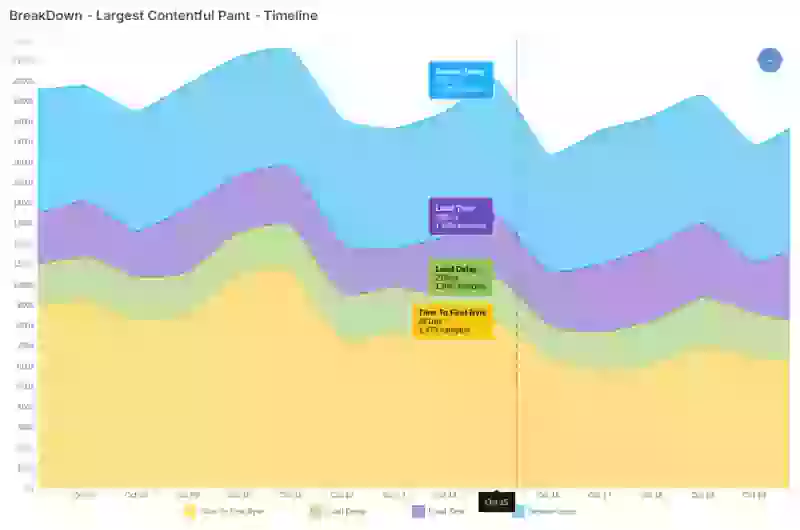
RUM tools often logs LCP attribution data. Attribution data for the Largest contentful Paint contains information about the resource load delay. 这些数据可以按时间或按页面可视化加载时长趋势,提供整个站点加载时间的清晰视图。通过分析这些模式,可以识别可能减慢加载时间的元素,并发现针对性的优化机会,以实现更快、更流畅的性能。
如何改善 LCP 加载时长
当资源以次优的顺序或大小下载时,就会发生资源加载延迟。解决此问题有两种主要方法:减少数据大小或优化数据传输。以下是改善 LCP 资源加载时长的有效技术和模式:
1. 优化文件大小:
优化文件大小可以减少通过网络发送的字节量。更少的数据通常意味着更短的下载时间。
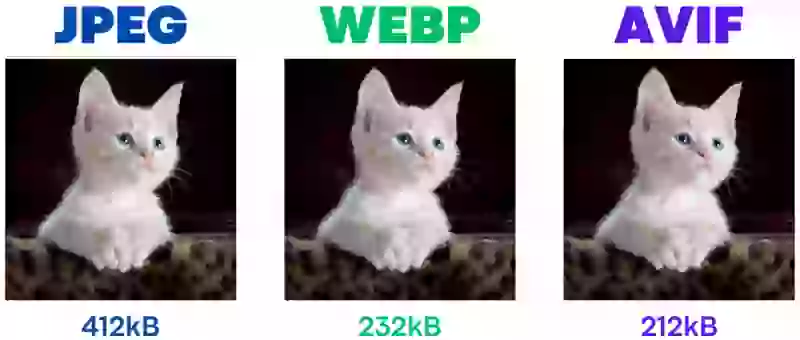
Use Modern Image Formats: AVIF 和 WebP 在压缩方面处于领先地位。特别是 AVIF,提供了广泛的压缩能力,与 WebP 相比通常可将文件大小减少多达 50%,使其成为复杂照片的理想选择而不牺牲质量。然而,WebP 保持了与更广泛浏览器的强兼容性,对于较简单的图片尤其有效。
Responsive Images: The <picture> element and srcset attribute enable tailored images based on screen size, allowing smaller image versions for mobile and high-resolution versions for larger screens. Here’s an example setup:
<picture>
  <source media="(min-width: 800px)" srcset="large.jpg 1x, larger.jpg 2x">
  <img src="photo.jpg" loading="lazy" alt="Description">
</picture>正确的图片尺寸:响应式图片只是解决方案的一部分,因为响应式并不意味着尺寸正确。将图片尺寸与显示大小匹配是我最常见到的错误之一。为 500 像素的显示区域提供 2000 像素宽的图片会浪费带宽,并可能明显减慢加载时间。
2. Improve network performance:
一旦资源网络大小得到优化,下一步就是最大化网络速度——甚至完全绕过网络。这可以通过以下方式实现:
Bypass Network Needs: 没有比跳过网络连接更快的网络连接了。浏览器可以选择直接从本地浏览器缓存中提供静态(不变的)内容,如图片、脚本和样式表。配置服务器向浏览器发送正确的缓存指令。例如使用 expires 头。
最有效的设置是发送如下的 Cache-Control 头:
Cache-Control: public, max-age=31536000, immutable
- public:允许浏览器和中间缓存都可以缓存该资源。
- max-age=31536000:将资源被视为新鲜的最长时间设置为一年(31,536,000 秒)。
- immutable:表示资源不会随时间变化,防止不必要的重新验证请求。
HTTP/3: The latest HTTP/3 protocol can improve network performance by reducing latency and handling packet loss more efficiently than traditional TCP. (HTTP/3 has several more benefits especially when it comes to the Time to Fist Byte)
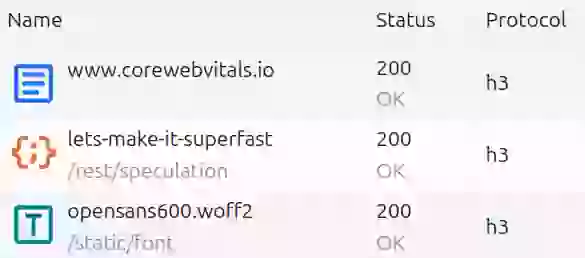
要检查 HTTP/3 是否已启用,只需使用 Ctrl-Shift-I 快捷键检查您的网络。选择网络标签,右键单击网络列标题并确保"protocol"已启用。重新加载页面并检查协议。对于 HTTP/3,协议应显示"h3"
Self-Hosting Resources: Important and/or early network resources should by default always be hosted on the origin server. Self-hosting sidesteps the need to connect to third-party servers which can cause considerable delays due to additional DNS lookups, SSL negotiations, and connection setups. Self-hosting ensures the reuse of a single, already open connection and reduces the overhead of establishing separate connections. Self-hosted resources also enables full control over compression and cache policies.
Utilize a CDN: A Content Delivery Network (CDN) is a network of distributed servers that cache and serve static resources like images, CSS, and JavaScript from locations closer to the user. This reduced the data travel time (the round-trip-time) which directly affects the Resource Load Duration. Apart from that many CDN's also offer more advantages like image compression, superior network configurations (like HTTP/3 & 0-RTT) and much more. Specialized Image CDNs can take this further by providing automatic, real-time optimizations like format conversion, resizing, and compression.
3. 优化资源优先级
在精简资源大小和优化网络之后,还有网络竞争的问题。当多个资源在网络条件较差的情况下同时被请求时,这可能会显著减慢资源下载时间。这就是为什么通过调度资源下载来最小化网络竞争是有意义的。
Prioritize Critical Resources: Flag essential resources, like hero images or above-the-fold CSS, with fetchpriority="high". This signals the browser to download these assets first, keeping them from getting bogged down by scripts, widgets, or third-party elements that don’t need instant loading. Prioritizing these critical resources reduces load time for the content your users care about most. The combination of preload (to solve for late discovery) and fetchpriority="high" (to solve for network contention) is the most powerful technique for ensuring the LCP resource is fetched as early and as quickly as possible.
<!-- For LCP images visible in the initial HTML -->
<img src="hero-image.webp" fetchpriority="high" alt="...">
<!-- To improve discovery  -->
<link rel="preload" href="hero-image.webp" as="image" fetchpriority="high">
Reduce Network Contention: Streamline initial downloads by deferring or lazy-loading non-essential assets. Postpone loading for any images or videos not immediately visible, as well as background or secondary elements. Using loading="lazy" for offscreen media is a good place to start, while further deferring other non-essential scripts and assets will free up bandwidth and cut down on any competition with your critical resources, keeping your page’s main content quick to load and display. Never apply loading="lazy" to your LCP image; this is a critical anti-pattern that will harm your score.
4. 设置推测规则
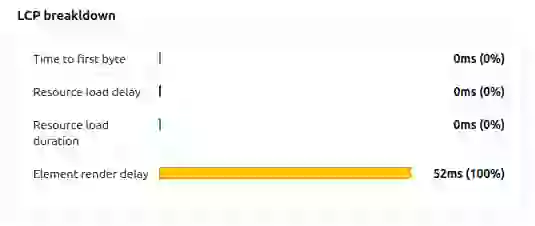
Speculation Rules enables browsers to prefetch or prerender web pages based on predicted user navigation. Prefetching effectively eliminates the Time to First Byte sub-part of the LCP and has no impact in the resource load duration. Prerendering renders the next page in a hidden tab and downloads all the page resources. This eliminated most of the load durations for the LCP element as shown in this example LCP breakdown of a prerendered page.
Compare your segments.
Is iOS slower than Android? Is the checkout route failing INP? Filter by device, route, and connection type.
- Device filtering
- Route Analysis
- Connection Types

