Strip Tracking Parameters with Cloudflare Workers and Transform Rules
Tracking parameters like fbclid and gclid create unique URLs that bypass your CDN cache. Three ways to fix it.

Why tracking parameters destroy your cache hit rate
Tracking parameters like utm_source, gclid, and fbclid help marketers measure campaign performance. For Core Web Vitals they are a nightmare because they break caching. Every unique URL creates a separate cache entry. A single page shared on Facebook gets a unique fbclid for every click, which means every visitor from Facebook gets a cache miss and a slow Time to First Byte.
Cloudflare gives you three ways to strip these parameters at the edge before they pollute your cache: Transform Rules (no code), Workers (full control), and Cache Key customization (Enterprise). I will cover all three.
Last reviewed by Arjen Karel on March 2026
The caching problem with tracking parameters
Caching systems use the full URL as the cache key. If a URL includes ?utm_source=google or ?fbclid=abc123, the cache treats it as a different page, even though the content is identical. That is a cache miss. The server rebuilds a page it already has cached, just because the URL has a different query string value.
The scale of this problem is bigger than most people realize. There are 129 known tracking parameters across the marketing ecosystem. The fbclid parameter is the most destructive because Facebook appends it to every outbound link click, not just paid ads. Every organic share, every link in a comment, every post that links to your site gets a unique fbclid value.
According to the 2025 Web Almanac, only 44% of mobile origins have a good TTFB. Cloudflare reported that fixing query string caching behavior improved cache hit rates by 3% on average and reduced origin bytes by 5%. That translates directly to faster Largest Contentful Paint for your visitors.
Not all query parameters are tracking junk. Parameters like ?q=laptops or ?color=blue change page content. The goal is to strip the parameters that do not affect content while keeping the ones that do.
Which tracking parameters should you strip?
Here are the most common tracking parameters grouped by platform. These create unique, uncacheable URLs without changing page content:
| Platform | Parameters |
|---|---|
| Google Ads | gclid, gclsrc, wbraid, gbraid, dclid, gad_source |
| Google Analytics | utm_source, utm_medium, utm_campaign, utm_term, utm_content, utm_id, _ga, _gl |
| Facebook / Meta | fbclid, fb_action_ids, fb_action_types |
| Microsoft Ads | msclkid |
| TikTok | ttclid |
| Twitter / X | twclid |
li_fat_id | |
epik | |
| Email / Marketing | mc_cid, mc_eid, _hsenc, _hsmi, mkt_tok, ck_subscriber_id |
This is not the full list. The tracking query params registry documents all 129 known parameters. For most sites, covering the Google, Meta, and Microsoft parameters handles 95% of the problem.
Option 1: Transform Rules (no code required)
Cloudflare has a built-in function called remove_query_args() that strips specific query parameters from the URL before it reaches the cache. This runs as a Transform Rule, requires no code, and is available on all plans including the free tier.
To set this up:
- In your Cloudflare dashboard, go to Rules then Transform Rules then URL Rewrite
- Create a new rule
- Set the filter to match your domain, for example
(http.host eq "example.com") - For Query, select Rewrite to then Dynamic
- Enter the expression:
remove_query_args(http.request.uri.query, "utm_source", "utm_medium", "utm_campaign", "utm_term", "utm_content", "utm_id", "gclid", "gclsrc", "wbraid", "gbraid", "dclid", "gad_source", "fbclid", "msclkid", "ttclid", "twclid", "li_fat_id", "epik", "srsltid", "_ga", "_gl") - For Path, select Preserve
That is it. No Worker, no code deployment. The free plan allows 10 Transform Rules, Pro allows 25. For most sites this is the best option.
Option 2: Cloudflare Workers
Cloudflare does have out-of-the-box options to ignore query strings, but their conservative settings are not enough to get the most out of your Cloudflare plan. If you need more control than Transform Rules offer (for example, regex matching, conditional logic, or logging), a Cloudflare Worker gives you full flexibility.
Workers intercept requests at the edge and run your code before the request hits the cache or origin. Cloudflare loads Workers during the TLS handshake, so the effective overhead is under 1 millisecond.
The code
Below is the complete Worker script using the current ES modules syntax:
export default {
  async fetch(request) {
    const url = new URL(request.url)

    const trackingParams = /^(utm_|gad_|gclid|gclsrc|wbraid|gbraid|dclid|fbclid|fb_action_|srsltid|msclkid|ttclid|twclid|li_fat_id|epik|igshid|_ga$|_gl$|mc_[ce]id|_hs[em])/

    // Collect matching keys first (do not delete during iteration)
    const keysToDelete = [...url.searchParams.keys()].filter(
      key => trackingParams.test(key)
    )

    keysToDelete.forEach(key => url.searchParams.delete(key))

    return fetch(url.toString(), request)
  }
}
The Worker parses the URL, tests each query parameter against a regex, and removes matches. The clean URL then goes to the cache and origin. Two details matter here: the code collects keys into an array before deleting them, because deleting during URLSearchParams iteration can skip entries (this is a known spec issue with live iterators). And the script uses the ES modules format (export default) because Cloudflare has deprecated the older addEventListener syntax.
Deployment
- Sign in to Cloudflare. Log in to your Cloudflare dashboard.
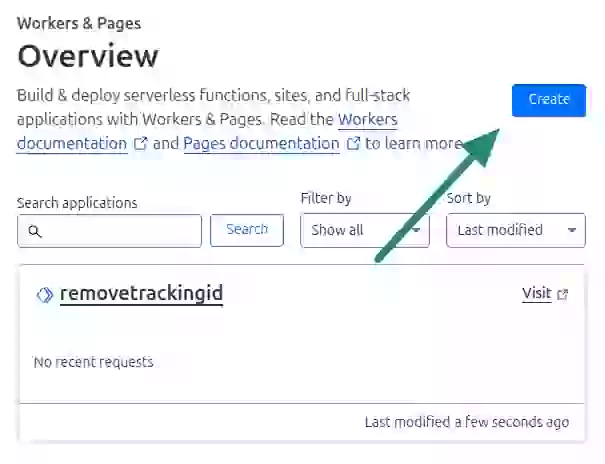
- Create a Worker. Do not navigate to your site yet. Navigate to the Workers section and create a new Worker.
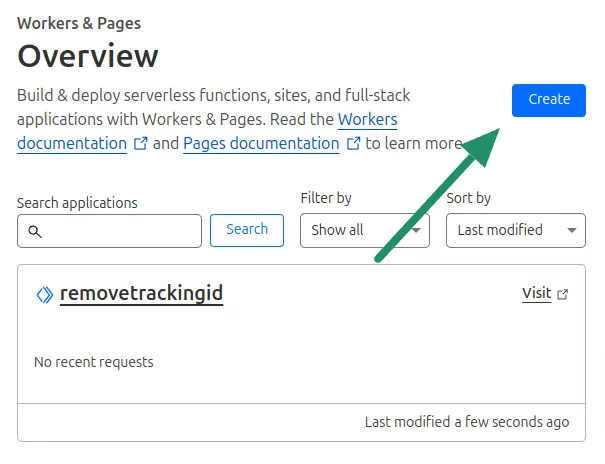
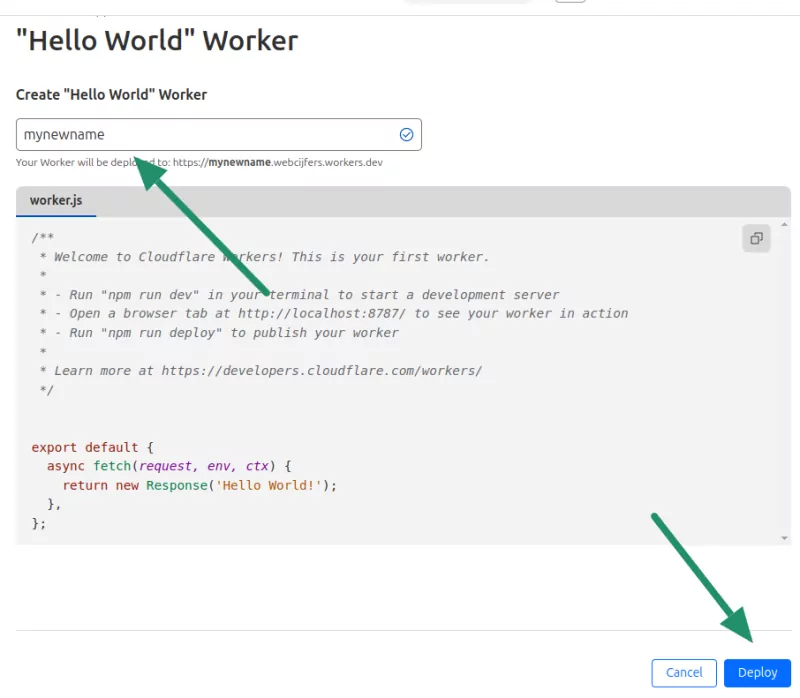
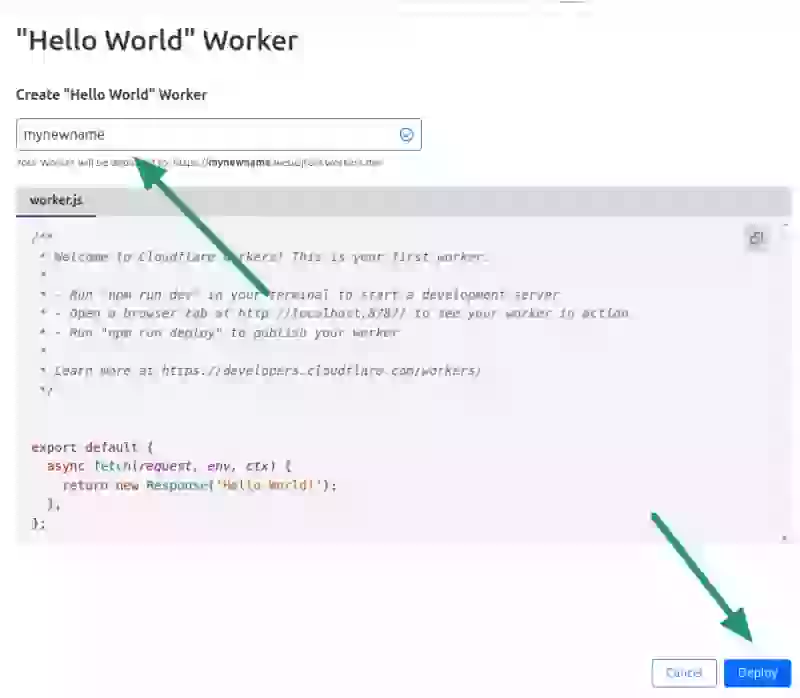
- Name the worker and deploy. This step may look a little counter intuitive but do not worry. Just name your empty 'hello world' worker and click deploy.
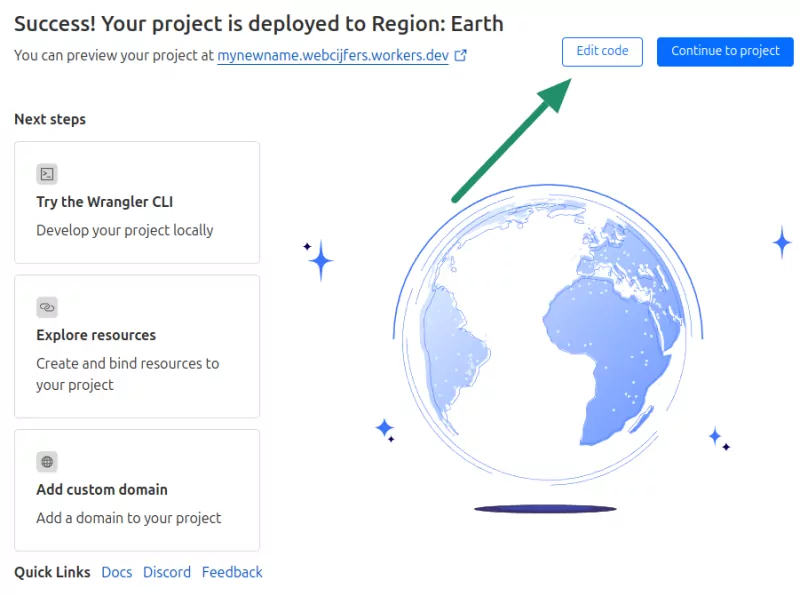
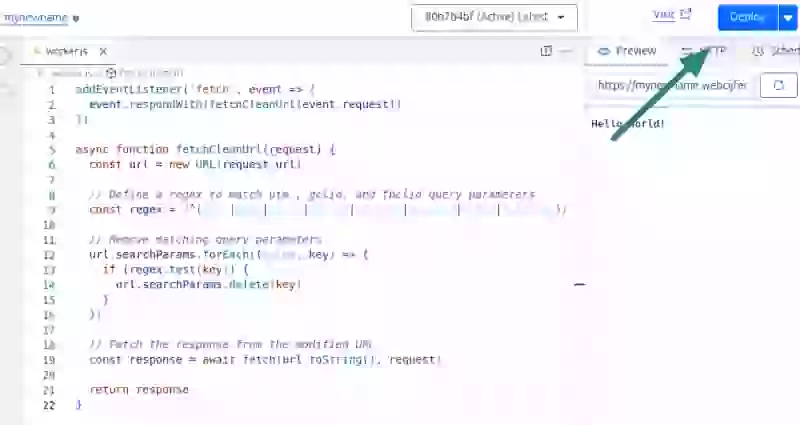
- Edit your worker. On the next page click on Edit Code.
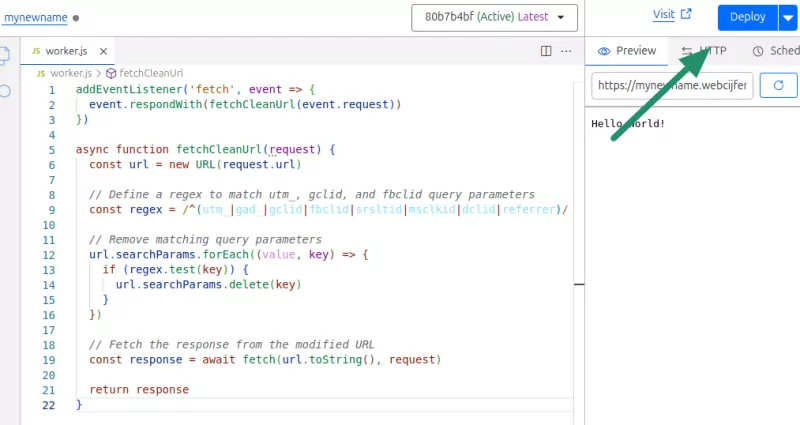
- Paste the script. Copy and paste the above script into the editor. Then click deploy.
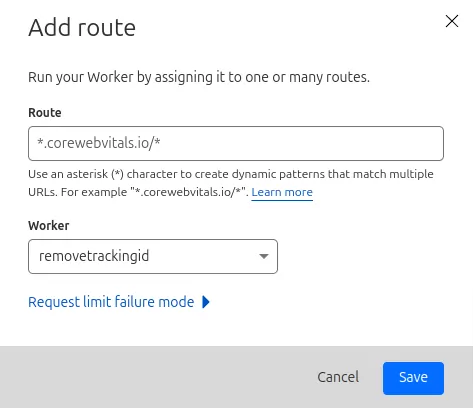
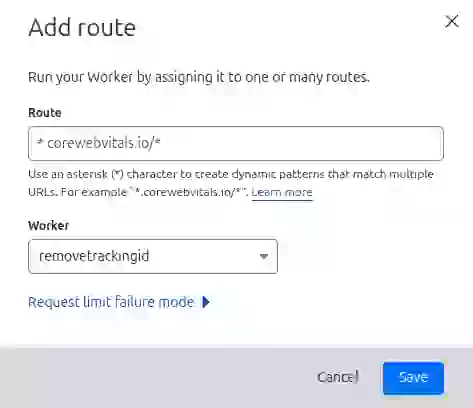
- Bind the Worker to a route. Now go back and navigate to your site in Cloudflare. Click on worker routes and then on 'Add Route'. Select the newly created worker and apply it to your site.

Customization
You can modify the regex to include or exclude specific parameters. If you want to preserve certain utm_ parameters for server-side processing, remove them from the regex. If you use a marketing platform not covered by the default regex, add its parameters.
Option 3: Cache Key customization (Enterprise)
If you are on a Cloudflare Enterprise plan, you can configure custom cache keys to exclude specific query parameters without stripping them from the URL at all. The cache simply ignores them when computing the key. This is the cleanest approach because the URL stays unchanged, but it requires Enterprise.
For non-Enterprise plans, the Transform Rule or Worker approach achieves the same cache benefit.
Which approach should you use?
| Approach | Plans | Code required | Best for |
|---|---|---|---|
| Transform Rules | All (Free, Pro, Business, Enterprise) | No | Most sites. Simple, reliable, no maintenance. |
| Cloudflare Workers | All (Free tier: 100K requests/day) | Yes | Sites that need regex matching, conditional logic, or logging. |
| Cache Key Rules | Enterprise only | No | Enterprise sites that want parameters preserved in the URL but ignored by cache. |
For most sites, start with Transform Rules. If you hit the rule limit or need more flexibility, move to Workers.
If you use WordPress with Cloudflare APO, you may not need any of this. APO maintains an allowlist of 25+ marketing parameters that it ignores when computing cache keys. Check whether your specific parameters are covered before adding a Worker or Transform Rule.
Does stripping parameters break analytics?
No. Stripping happens at the edge, between the CDN and your origin server. The browser URL still contains the original tracking parameters. Google Analytics, Google Ads conversion tracking, and Facebook's pixel all read from document.location on the client side, which still has the full URL with all parameters intact.
The only scenario where this could cause issues is if your server-side code reads tracking parameters from the URL (for example, a server-side analytics implementation). In that case, either exclude those parameters from stripping or capture them in a request header before the Worker removes them.
For a broader look at how tracking and analytics scripts affect performance beyond caching, see The Case for Limiting Analytics and Tracking Scripts.
How to find which URL parameters to strip
Finding out which URL parameters to strip is easy if you use the right tool. Real User Monitoring tools like CoreDash monitor your site 24/7 and log all query strings along with their impact on performance. In CoreDash, navigate to Largest Contentful Paint and view the results by query string.

Across sites monitored by CoreDash, pages with stripped tracking parameters show roughly 8 to 15% better cache hit rates. For visitors who would otherwise get a cache miss, that translates to 200 to 500ms faster TTFB.
If you are on Cloudflare and your cache duration TTFB sub-part is high, tracking parameter pollution is one of the first things to check. Combine parameter stripping with the right Cloudflare configuration and you will see a measurable improvement in your field data.
Real time data. Not 28 day averages.
CoreDash segments every metric by route, device, browser, and connection type.
Explore CoreDash
