Free Website cache warmer
Pre-warm your website's cache to speed up the Core Web Vitals for free

Free Website cache warmer
Ever wondered why some websites, like mine, load instantly? A big part of the answer is caching. By storing frequently accessed data on the server or on the edge, caching eliminates the need for expensive server-side calculations, resulting in much faster page loads.
Last reviewed by Arjen Karel on March 2026
These days most sites have one or more layers of caching, built in by default or added through a plugin. Yet somehow most caching plugins hardly improve performance. That is probably due to a low cache hit ratio. Fortunately we can increase the cache hit ratio or detect cache hit ratio issues by using a cache warmer.
What is a cache warmer?
Cache warming is the process of preloading frequently accessed pages into the server or edge cache before they are requested by users. Once the pages have been cached, the server can serve them directly from cache and does not need to build the page on the fly.
A cache warmer will generally "crawl" a website based on rules set by the website owner. My Chrome extension "the cache warmer" takes a simple approach to these rules:
- On opening the extension the homepage of the current website is shown
- When you activate the cache warmer it visits the homepage and extracts all URLs
- The URLs are sorted by weight and the first unvisited page with the highest weight is crawled
- This process repeats until all the pages are crawled or the maximum set amount of pages is crawled, whichever happens first
How does a cache warmer improve pagespeed performance?
The primary goal of cache warming is to prevent "cache misses," which occur when the requested data is not found in the cache and must be built on the fly by the server. This obviously takes longer than serving pages from cache.
Take a look at this CoreDash Time to First Byte distribution. It clearly shows two bell curves. The first, fast and green curve shows cached HTML pageviews. The second, broader bell curve shows slower uncached pageviews.
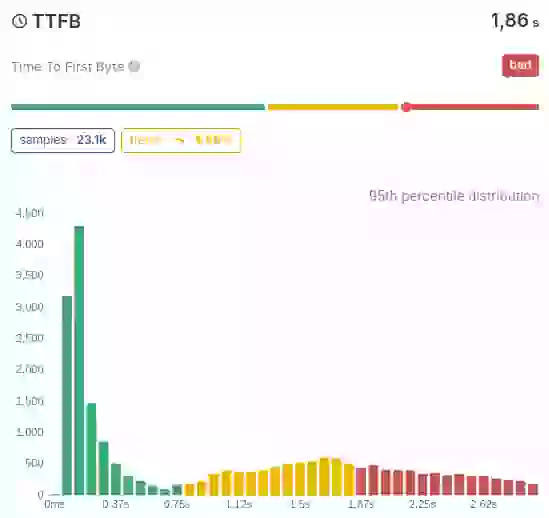
In our Real User Monitoring data, the median TTFB for cached page loads is around 85ms, while uncached loads average 650ms. That is roughly an 8x difference, and it shows up directly in your LCP scores.
A poor Time to First Byte will always lead to poor paint metrics like the First Contentful Paint and the Largest Contentful Paint, and that will lead to failed Core Web Vitals.
These poor metrics tend to sneak up on unsuspecting site owners because they can be difficult to replicate. While testing your own site you will quickly rebuild that cache and it becomes easy to miss this problem.
So what did I do? I created a free, powerful one-click cache warmer Chrome extension that keeps your cache warm without complex command-line tools.
You can find it here: Website Cache Warmer on the Chrome Web Store
How to use the cache warmer
Using the cache warmer is pretty easy! These are the steps to take:
1. Install the Cache Warmer from the Chrome Web Store.
2. To ensure my fun little plugin is not your latest free DDOS tool you do need to add this to your robots.txt to remove crawl limitations:
User-agent: CacheWarmer
Crawl-delay: 0
3. Make sure you have enough RUM data from before. You can use a RUM tool like CoreDash which is by far your most budget friendly option.
4. Run the plugin. You will see that your pages are being crawled. Each time we visit a page a fresh cached version of your page should be created.
5. Ensure your cache is not invalidated manually. That means do not publish new content updates to your site for a few hours and compare the before and after.
If you notice a huge difference (especially in the breakdown section of the LCP where the LCP is plotted against the TTFB) that is a great indication your caching is not set up correctly. Consider reviewing your CDN and caching configuration to fix the root cause.
Find out what is actually slow.
I map your critical rendering path using real field data. You get a prioritized fix list, not a Lighthouse report.
Get the audit
