Layout Shift caused by CSS transitions
Learn how to find and remove CSS transitions that create layout shifts

Why CSS transitions cause layout shifts
Cumulative Layout Shifts caused by CSS transitions usually happen early, during the loading phase of the page. A transition on width or height animates the change in size when a late stylesheet or script changes the style, and the content below moves with it. These shifts do not happen on every page view. That makes them hard to debug.
Last reviewed by Arjen Karel in March 2026
Table of Contents!
The transition: all problem
The cause I find most often is transition: all. It is everywhere. According to the 2022 Web Almanac's CSS chapter, 53% of pages use it, more than any other transition property. So width and height animate too, and they move the content around the element.
A CSS transition has four parts: the property, the duration, the timing function and a delay. In shorthand:
/* property | duration | timing-function | delay */
transition: margin-right 4s ease-in-out 1s;
The problem starts with transition: all .3s ease on an element where the developer only meant to fade a hover color.
A transition never runs on the first style the browser computes for an element. It only runs when that style changes later, and during page load that happens a lot: a stylesheet that arrives late, or a script that adds a class to the navigation menu. With transition: all the browser animates the change in size too. So the menu above the fold grows into place over 300 milliseconds and pushes everything below it down. A layout shift that only happens during loading. Good luck reproducing it.
Which CSS properties cause layout shift?
Not every CSS transition causes layout shifts. Only a property that changes the size or position of an element makes the browser run layout again, and only layout moves the content around it. According to Google's research, pages that animate layout-inducing CSS properties are 15% less likely to pass CLS. Margin and border-width are worse. Pages that animate those have poor CLS at nearly twice the normal rate.
Every one of these properties triggers layout recalculation, so transitioning any of them can displace the element itself or the surrounding content: width, height, margin, padding, top, left, right, bottom, border-width, font-size.
Safe for CLS: transform and opacity can run on the compositor. Filter and clip-path cost at most a repaint. Neither pair triggers layout.
Paint only, so safe for CLS as well: background-color, color, box-shadow, outline.
Transform and opacity are the two that matter. A transform does not change the position of the element in the layout, so CLS never counts it as a layout shift. Need to move an element? Use transform: translate() instead of top and left. To make it look bigger or smaller, use transform: scale() instead of width and height.
Hover is no excuse either. CLS ignores shifts in the 500 ms after a click, a tap or a key press, but moving the mouse over an element is not that kind of input, so a hover transition on width counts in full.
The video below shows a transition shifting the layout during the loading phase. I see this all the time. Finding it takes some digging.
Find and fix CSS transitions
To find every layout shift caused by a CSS transition, first list all the transitions on the page and check which of them animate a property that affects layout, then disable or change those and measure whether the CLS goes away.
Core Web Vitals tip: these shifts happen early in the page load, and not on every visit. Emulate a mobile device, throttle the network and disable the cache. On a slow load the browser paints the page before that late stylesheet or script arrives, so the shift shows up far more often.
Step 1: Find CSS transitions
You can find CSS transitions by hand: open every stylesheet and search for the word 'transition'. Ten minutes, maybe. Faster: paste this snippet in the console and press Enter.
(() => {

  let nodeTable = [];
  let nodeArray = [];

  // Get the name of the node
  function getName(node) {
    const name = node.nodeName;
    return node.nodeType === 1
      ? name.toLowerCase()
      : name.toUpperCase().replace(/^#/, '');
  }

  // Get the selector
  const getSelector = (node) => {
    let sel = '';

    try {
      while (node && node.nodeType !== 9) {
        const el = node;
        const part = el.id
          ? '#' + el.id
          : getName(el) +
          (el.classList &&
            el.classList.value &&
            el.classList.value.trim() &&
            el.classList.value.trim().length
            ? '.' + el.classList.value.trim().replace(/\s+/g, '.')
            : '');
        if (sel.length + part.length > (100) - 1) return sel || part;
        sel = sel ? part + '>' + sel : part;
        if (el.id) break;
        node = el.parentNode;
      }
    } catch (err) {
      // Do nothing...
    }
    return sel;
  };

  const getNodesWithTransition = (node) => {

    // Get the computed style
    let cs = window.getComputedStyle(node);
    let tp = cs['transition-property'];
    let td = cs['transition-duration'];

    // If there is a transition, add it to the table
    if (tp !== '' && tp !== 'none' && td != '0s') {
      nodeTable.push({ selector: getSelector(node), transition: cs['transition'] });
      nodeArray.push(node);
    }

    // Recursively call this function for each child node
    for (let i = 0; i < node.children.length; i++) {
      getNodesWithTransition(node.children[i]);
    }
  }

  // find all transitions
  getNodesWithTransition(document.body);

  // Display the results in the console
  console.log('%cReadable table of selectors and their transitions', 'color: red; font-weight: bold;');
  console.table(nodeTable);

  console.log('%cNodeList for you to inspect (harder to read but more info)', 'color: red; font-weight: bold;');
  console.log(nodeArray);


  // styles to temporarity override the transitions
  let selectors = nodeTable.map((item) => item.selector).join(', ');

  console.log('%cSpecific CSS to disable all transitions on this page', 'color: red; font-weight: bold;');
  console.log(`<style>${selectors}{transition-property: none !important;}</style>`);

  console.log('%cGlobal CSS to disable all transitions on this page (not suggested on production)', 'color: red; font-weight: bold;');
  console.log(`<style>*{transition-property: none !important;}</style>`);

})()
It prints a table with every transition on the page and the element it sits on.

Now read the transition column. Start with every row that says all: it covers every property that can be animated, including width and height. Then look for rows that name width or height directly. Margin and padding move content too, and so do top and left.
Step 2: Modify CSS transitions
The snippet also prints the CSS to switch those transitions off. For a quick test, take the easy road and disable every transition with one line:
<style>*{transition-property: none !important;}</style>On a live site you need a bit more finesse. Remove only the transition properties you don't need, selector by selector. For example, change #button{transition: all .2s} to #button{transition: background-color .2s}.
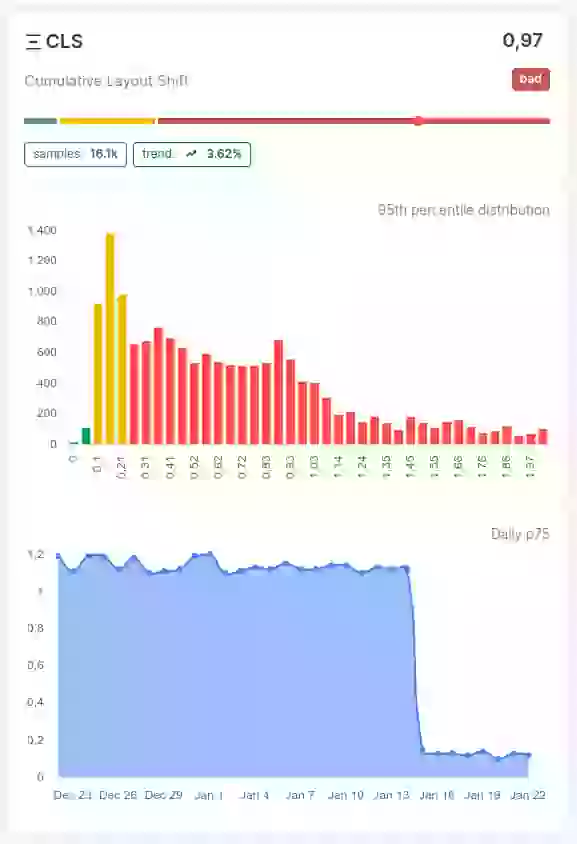
Step 3: Measure the change in layout shift
Transition best practices
- Name the exact property. Write
transition: background-color .2s easeinstead oftransition: all, and a property you didn't mean to animate can't shift anything. - Animate transform and opacity. The browser can run both on the compositor and neither one triggers layout. Use
transform: translate()to move an element andtransform: scale()to resize it. Opacity fades it. That is what Google recommends too. - Give an element that has to transition an explicit width and height, or an aspect ratio, both before and after the transition, so the content around it stays put. More on that in fixing layout shifts caused by auto-sizing images.
- Go easy on
will-change. It tells the browser to prepare for an animation by promoting the element to its own compositor layer. That has a price. Withwill-change: transformthe element gets a new stacking context and becomes the containing block for its positioned descendants, and every extra layer takes GPU memory. Set it with JavaScript just before the animation starts and remove it when the animation ends. Don't leave it in the stylesheet permanently.
Plenty of sites still get this wrong. The 2025 Web Almanac finds non-composited animations on 40% of mobile pages. CLS is the Core Web Vital with the highest pass rate, 81% on mobile. If your site is in the 19% that fails, CSS transitions might be the cause you have not checked yet.
Real time data. Not 28 day averages.
CoreDash segments every metric by route, device, browser, and connection type.
Explore CoreDash
