Instant Loading Pages with Speculation Rules
Learn how to improve the Core Web Vitals by making pages load instantly with the Speculation Rules API

Instantly improve the Core Web Vitals with the Speculation Rules API
Ever wondered why some pages seem to load instantly? That is probably because that page implemented Speculation Rules!
The Speculation Rules API enhances the speed of future page loads in multi-page applications (MPAs) by either prefetching or even prerendering them. Developers can configure speculation rules to suggest the browser to prefetch or prerender documents for faster (or instant) page loads. Speculation rules replace older techniques like <link rel="prefetch"> for prefetching resources or the deprecated Chrome-only <link rel="prerender">.
Speculation rules work on a document level, making them suitable for MPAs that involve full page navigations. Single-page applications (SPAs) that primarily use API calls or partial content updates would not benefit as much from this API for their internal route changes. However, Speculation Rules can still benefit SPAs by prerendering the application's initial state from a landing page, potentially offsetting the initial load time.
Last reviewed by Arjen Karel on February 2026
Table of Contents!
- Instantly improve the Core Web Vitals with the Speculation Rules API
- Speculation Rules QuickStart
- Real world impact
- Benefits of Speculation Rules
- Browser support
- Speculation Rules Mechanics
- Prefetch or Prerender
- Setting the right eagerness
- Check and debug speculation rules
- Considerations
- Speculation Rules and WordPress
Speculation Rules QuickStart
Already know what the speculation rules are? Awesome! Here are some ready to go snippets for you to get started immediately. Just pick the right snippet for you and place it in the <head> of your page (feel free to change prerender to prefetch and or the eagerness)!
<!--
   WordPress speculation rules by corewebvitals.io
   prefetches all internal links
   skips links that match wp-login, wp-admin, wp content
   skips links that have the nofollow attribute
   skips links that have a query string for example: /search?q=welcome
-->
<script type="speculationrules">
{
    "prefetch": [{
        "source": "document",
        "where": {
            "and": [
                { "href_matches": "\\/*" },
                { "not": {
                    "href_matches": [
                        "\\/wp-login.php",
                        "\\/wp-admin\\/*",
                        "\\/*\\\\?*",
                        "\\/wp-content\\/*"
                    ]
                }},
                { "not": {
                    "selector_matches": "a[rel~=\\"nofollow\\"]"
                }}
            ]
        },
        "eagerness": "moderate"
    }]
}
</script>
<!-- Data-preload triggered speculation rules by corewebvitals.io -->
<script type="speculationrules">
{
"prefetch": [{
"source": "document",
"where": {
"selector_matches": "a[data-preload]"
},
"eagerness": "moderate"
}]
}
</script> Tip: if you quickly need to build your own speculation rules why don't you try the <b>speculation rules generator</b>
Real world impact
Speculation rules are not theoretical. The biggest names on the web are already using them with measurable results.
Ray-Ban implemented prerender rules on their product listing pages with moderate eagerness. The LCP dropped from 4.69 seconds to 2.66 seconds on mobile (43% faster). Mobile conversion rates increased by 101% and desktop conversions by 156%.
Shopify rolled out conservative prefetch across their entire platform in June 2025. Their A/B tests showed a 130ms average improvement on desktop and 180ms on mobile across all paint metrics.
Cloudflare Speed Brain, launched September 2024, adds speculation rules to all Cloudflare plans by default. Sites with successful prefetches saw a 45% LCP reduction.
Even Google Search uses speculation rules: search results are prefetched with eager eagerness, saving 67ms on Android LCP per click.
Across sites monitored by CoreDash, prerendered navigations have a p75 LCP of 320ms compared to 1,800ms for standard navigations on the same sites. That is an 82% improvement from a single API. Sites using speculation rules with moderate eagerness see roughly 28% of navigations successfully prefetched or prerendered. Prefetched navigations show a p75 TTFB of just 45ms, because the HTML is already in the browser's in-memory cache.
Benefits of Speculation Rules
Improved User Experience (UX): By predicting and preloading content, Speculation Rules ensure near-instant page loads, making navigation feel seamless for users. This rivals the performance of single-page applications even for traditional multi-page websites without the complexity and JavaScript reliance. Faster loading times means a better browsing experience, likely increasing user engagement and reducing bounce rates.
SEO Advantages: Since improved page speed is a direct ranking factor and a better Time to First Byte will result in a better Largest Contentful Paint, implementing speculation rules is bound to improve the Core Web Vitals and give you that PageSpeed bonus.
Reduced complexity: Near instant page loads used to be possible only by using a SPA or writing custom prefetch logic for MPAs. For many use cases the downside of a SPA is the initial boot up time, which can be considerable since they rely heavily on JavaScript, and the increased complexity compared to an MPA. Speculation rules do not have these problems. This makes fast loading achievable for a broader range of websites, especially content-focused ones.
The API also simplifies the process of deciding which pages to prerender by delegating much of the logic to the browser. This is a huge improvement on previous methods that relied on JavaScript to make these checks and inject pages to preload. Browsers can natively factor in user context, such as low memory on mobile devices or battery saver mode, when deciding whether to prerender. This dynamic adaptation helps conserve user resources and ensures a smoother experience even under constraints.
Other benefits: The Speculation-Rules HTTP header allows for easier deployment via Content Delivery Networks (CDNs), eliminating the need to modify document content directly. Granular control with document rules allows developers to define precise conditions for prefetching or prerendering based on URL patterns or CSS selectors. This reduces manual URL specification and allows for site-wide speculation rulesets. The "eagerness" setting provides fine-grained control over when speculation occurs, balancing preloading speed with resource consumption. This helps reduce unnecessary preloading and prevents resource waste.
Browser support
Speculation rules are supported in Chrome 109+, Edge 109+, and all Chromium-based browsers. That covers roughly 79% of global browser traffic according to Can I Use. Firefox has declared a positive standards position for the prefetch portion but has not shipped support yet. Safari 26.2 has a working implementation behind a flag but it is not enabled by default.
For browsers that do not support speculation rules, you can use feature detection to fall back to <link rel="prefetch">:
if (HTMLScriptElement.supports &&
    HTMLScriptElement.supports('speculationrules')) {
  // browser supports speculation rules
} else {
  // fallback: inject <link rel="prefetch">
  const link = document.createElement('link');
  link.rel = 'prefetch';
  link.href = '/next-page.html';
  document.head.append(link);
}
Speculation Rules Mechanics
Speculation rules are defined using a JSON structure and can be implemented in two ways:
- Inline Script: Include the JSON within a
<script type="speculationrules">tag either in the<head>or<body>of the main HTML document. - HTTP Header: Deliver rules using the
Speculation-RulesHTTP header in the document's response. This header points to a JSON file containing the rules, facilitating easier CDN deployments without modifying the HTML content directly.
The JSON structure uses "prefetch" and "prerender" arrays to contain rules for each speculative loading type. Each rule can use different sources: either a list of URLs or document rules.
- urls (a list of URLs): An array of URLs to prefetch or prerender.
- where (document rules): An object that uses conditions to determine which links on the page should be prefetched or prerendered.
Each rule is defined as an object that includes properties such as:
- requires: An array of strings to set restrictions on speculations. Currently, the only valid string is "anonymous-client-ip-when-cross-origin," indicating that a cross-origin prefetch should anonymize the client's IP address.
- target_hint: A string providing a hint about the navigable target name ("_self" or "_blank"), allowing the user agent to optimize the loading process.
- referrer_policy: A referrer policy to apply to prefetched or prerendered URLs.
- relative_to (only for "list" source): Specifies whether the URLs provided in the "urls" array are relative to the document's base URL ("document") or the location of the speculation rules JSON file ("ruleset").
- eagerness: Controls how aggressively the browser should prefetch or prerender. The available settings are "immediate," "eager," "moderate," and "conservative," each with different triggers.
- expects_no_vary_search: A hint that tells the browser whether the speculated URL is expected to have a different response based on the search parameters. Useful for pages with UTM parameters or other tracking query strings that do not change the content.
Finally each rule has an eagerness setting which allows you to define when speculations should run, separating when to speculate from which URLs to perform speculations on. The eagerness setting is available for both list and document source rules and has four settings: immediate, eager, moderate, and conservative.
- immediate: This is used to speculate as soon as possible, as soon as the speculation rules are observed.
- eager: On desktop this triggers after hovering over a link for 10 milliseconds. On mobile (from January 2026) it triggers 50ms after a link enters the viewport.
- moderate: This performs speculations if you hover over a link for 200 milliseconds (or on the pointerdown event if that is sooner, and on mobile where there is no hover event).
- conservative: This speculates on pointer or touch down.
Chrome limits
Chrome enforces limits on concurrent speculations to prevent abuse and protect device resources:
- immediate / eager: Up to 50 prefetches and 10 prerenders.
- moderate / conservative: Up to 2 prefetches and 2 prerenders (FIFO: new speculations replace the oldest ones).
Chrome also disables speculation entirely when Save Data mode is enabled, the device is in Energy Saver mode with low battery, or the user has disabled the "Preload pages" setting.
Prefetch or Prerender
The Speculation Rules API supports two primary forms of speculative loading: prefetching and prerendering. Although both techniques can result in faster page loads, they differ in their complexity and resource consumption.
- Prefetching is the lighter form of speculative loading. It downloads and caches the HTML of the target URL without rendering the page or its subresources. This approach mainly improves the Time to First Byte. An improved Time to First Byte will lead to better paint metrics like the Largest Contentful Paint and First Contentful Paint.
- Prerendering does much more than only downloading the HTML. It downloads the HTML, all subresources and renders the entire page in a hidden, invisible tab. Upon navigation to this page this results in near-instantaneous display. This technique improves the Largest Contentful Paint in more ways than only by improving the Time to First Byte. It also downloads and renders the LCP element. Prerendering can also eliminate the Cumulative Layout Shift because resource dimensions are already known after prerendering.
There is also a third option: prerender until script. This new feature (Chrome 144, January 2026) fetches HTML, begins rendering and subresource loading, but pauses JavaScript execution at the first blocking script tag. This eliminates script side effects (like analytics firing) while still preloading CSS, images and fonts.
So what is better? Prerendering or Prefetching? That depends on the page and the average visitor. While prerendering may be faster by design it also uses much more resources, both on the client as well as the server. The choice for prerendering or prefetching depends on:
- User's device capabilities: Prerendering might not be the best choice if a high percentage of visitors visits on devices with limited memory.
- Prerender or prefetch rule specificity. Some links are more likely to be clicked and some pages are more likely to convert. Those pages are perfect candidates for a prerender rule. Other pages might be more suited to prefetch.
I would caution against excessive prerendering due to its resource demands, particularly on mobile devices or slower connections. The potential benefits of prerendering must be weighed against the risk of performance degradation and resource waste.
Setting the right eagerness
Which eagerness setting to use depends on your site. For a very simple static site, speculating more eagerly may have little cost and be beneficial for users. Sites with more complex architectures and heavier page payloads may prefer to reduce waste by speculating less often until you get more positive signal of intent from users to limit waste.
The eagerness setting in the Speculation Rules API influences when a browser should prefetch or prerender content based on predicted user navigation. This setting offers a trade-off between maximizing preloading benefits and minimizing resource waste.
The default eagerness for list rules is immediate. The moderate and conservative options can be used to limit list rules to URLs that a user interacts with to a specific list. In many cases, document rules with an appropriate where condition may be more appropriate.
The default eagerness for document rules is conservative. Given a document can consist of many URLs, the use of immediate or eager for document rules should be used with caution.
When configuring eagerness, developers should factor in user experience, resource costs, and browser limitations. Over-speculation can strain user bandwidth, memory, and CPU, potentially degrading performance, especially on constrained networks or devices. Additionally, factors like user-configured Save Data modes, low battery conditions, or browser extensions can override speculation rules, prioritizing resource conservation.
Check and debug speculation rules
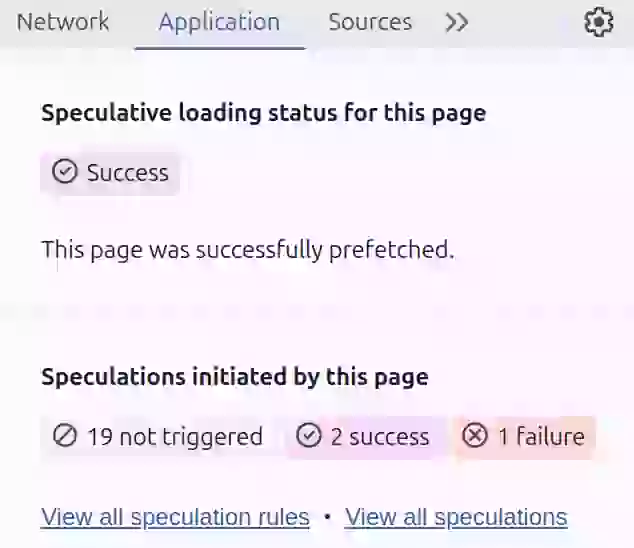
To check for any speculation rules on a page, open Chrome DevTools, go to the Application panel, and navigate to Background Services > Speculative Loads > Speculations. (open the Speculations pane before loading the page you want to debug) This panel provides information about:
- The number of successful speculations.
- Individual URLs being prerendered or prefetched.
- The status of each speculation.
The Network track in the Performance panel displays the network activity related to prerendered resources without needing to switch the DevTools context. Additionally, you can switch the DevTools context to a prerendered page to inspect it like a regular page.
Monitoring and analyzing Speculation Rules
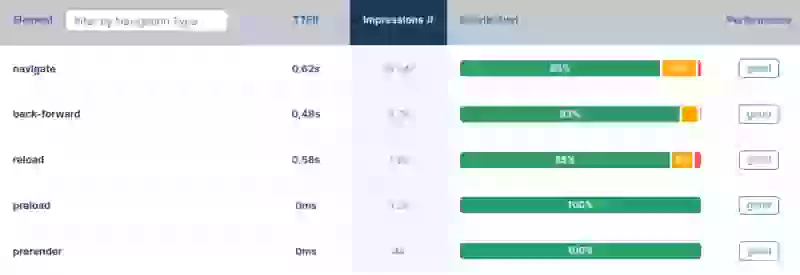
- Real User Monitoring (RUM): Use RUM tools to measure actual user experience. Observe metrics like Largest Contentful Paint (LCP) to assess the impact of speculation rules on page load times. Look for improvements in LCP for prerendered pages compared to non-prerendered pages.
- A/B Testing: Conduct A/B tests to compare different speculation rule configurations and identify the most optimal setup for your specific website and user base.
Considerations
Resource Consumption: Overusing speculation can negatively impact bandwidth, memory, and CPU usage. Start with conservative or moderate eagerness and monitor the results before increasing.
Browser Compatibility: Not all browsers fully support the Speculation Rules API. Use the feature detection code above to provide a fallback for non-Chromium browsers.
Privacy: Developers should be mindful of how speculation rules might reveal user browsing patterns and implement appropriate privacy measures. For cross-origin prefetch, use the "anonymous-client-ip-when-cross-origin" requirement to mask the client IP through Chrome's private prefetch proxy.
Analytics: Prerendered pages execute JavaScript, which means analytics scripts will fire before the user actually navigates. Google Analytics and Google Publisher Tag handle this automatically. For other analytics tools, delay initialization until the page is activated:
if (document.prerendering) {
  document.addEventListener('prerenderingchange', function() {
    initAnalytics();
  }, { once: true });
} else {
  initAnalytics();
}
The Speculation Rules API offers a powerful approach to enhancing the performance and user experience of web applications. By understanding its mechanics, benefits, and considerations, developers can use this API to build faster and more engaging websites.
Speculation Rules and WordPress
Since WordPress 6.8 (April 2025), speculation rules are built into WordPress Core. The default configuration uses prefetch with conservative eagerness, applied to all frontend pages when the visitor is not logged in and permalinks are enabled.
The WordPress Core Performance team also maintains a standalone Speculative Loading plugin (40,000+ active installs) that offers more control. The plugin provides two groups of settings:
- Speculation Mode: Choose between prefetch and prerender. Prerendering will result in faster load times than prefetching. However, prefetching might be a safer choice for interactive content.
- Eagerness: Choose between conservative (typically on click), moderate (typically on hover), or eager (on slightest suggestion). The eagerness setting determines how quickly speculative loads are triggered.
You can exclude specific paths from speculation using a PHP filter:
add_filter(
  'plsr_speculation_rules_href_exclude_paths',
  function($paths) {
    $paths[] = '/cart/*';
    $paths[] = '/checkout/*';
    return $paths;
  }
);
For more ways to defer scripts and optimize loading, see our complete guide.
I write the code, not the report.
I join your team for 1 to 2 sprints. I set up the monitoring and make sure your team keeps the metrics green after I leave.
Get in touch
